
PASCAL VOC
<p><span style= »color:white; »>”</p></span>
1. Introduction
- The PASCAL (Pattern Analysis, Statistical Modeling, and Computational Learning) network, funded by the European Union, plays a pivotal role in advancing research in computer vision and machine learning. One of its notable contributions is the establishment of the Visual Object Classes (VOC) Challenge. Running annually from 2005 to 2012, the VOC Challenge has been instrumental in pushing the boundaries of object detection technologies. Participants were provided with a series of images and corresponding annotations, with the challenge to develop models capable of accurately identifying objects within these images.
- In response to the inaugural 2005 challenge, the PASCAL VOC XML format was introduced, quickly becoming a standard labeling format within the field. Unlike the COCO JSON format, which uses a single annotation file for all images within a dataset, the VOC format assigns an individual XML file to each image. This approach offers a fine-grained and image-specific annotation process, facilitating detailed object detection and recognition tasks.
2. One annotation:
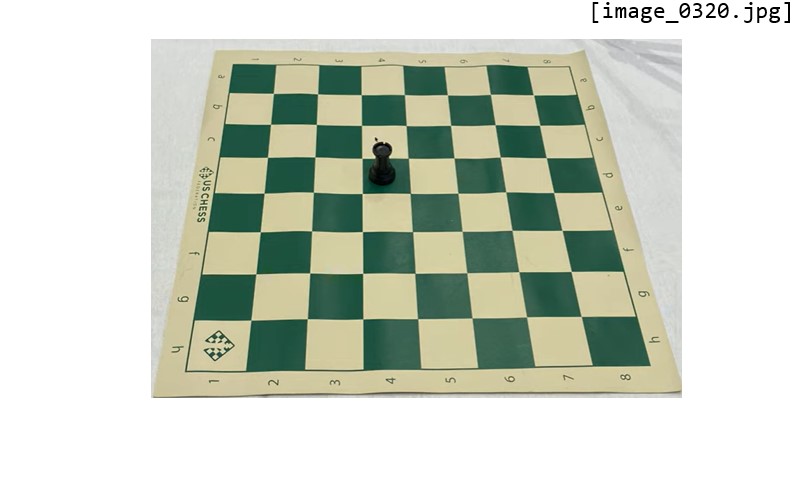
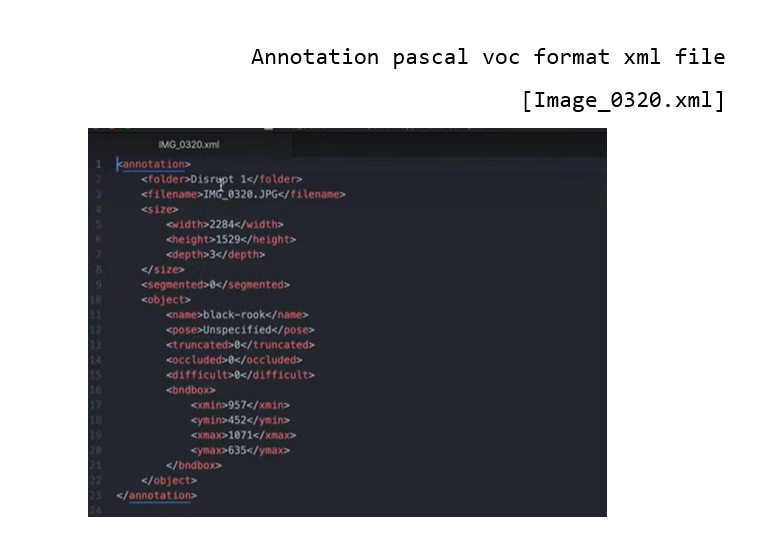
- The XML format is structured hierarchically, resembling a tree, and encapsulates all essential information within an 'annotation' tag. Key fields include:
- notice the open and closed bracket for annotation containing all the necessary information:
✓ Folder name (not important)
✓ File name (Extremely important): the file name in the voc xml annotation links the image to the annotation.
✓ Data about the image:
Width
Height
Depth: 3 RGB channels
Object: specifies where objects are annotated.
- Bounding box
- The box is created with two coordinates: two points in space and then we connect them.
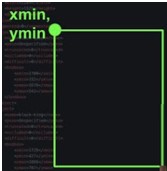
- In pascal voc you get the upper left-hand corner of the box and the bottom right-hand corner of the box so the upper left and bottom right if you draw lines between them then you get a nice neat box.
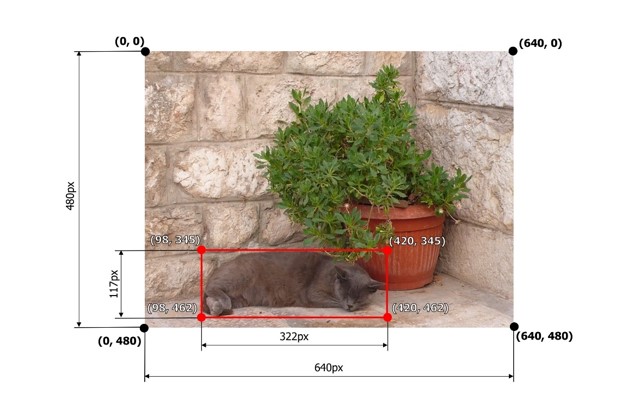
✓ In pascal voc the image is considered as a grid, with the origin (0,0) in the upper left-hand portion of the image.
✓ If an annotation starts in the upper left-hand corner, it would have a xmin=0 and ymin=0
✓ If the annotation ends at the bottom right-hand corner xmax=640 and ymax=480 could say have
✓ For the red square we would have the following coordinates:
- xmin =98
- ymin 345
- xmax = 420
- ymax = 462
3. Multiple annotations:
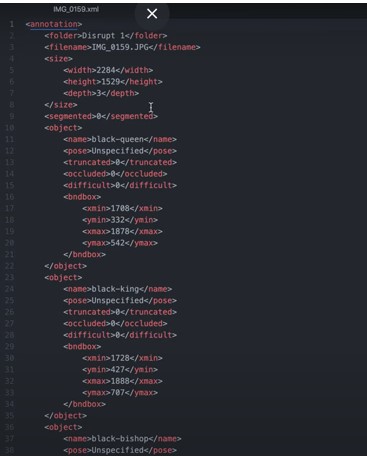
✓ For an image containing multiple objects and corresponding annotations, the pascal voc xml file contains annotation names and coordinates of the bounding boxes of all the objects in the image.
✓ In the example above we have the black_bipshop chess piece object and the black_king object with their corresponding information.
✓ Note that it is possible to generate a pascal voc xml file with no annotation in the case of an image with no objects in it, so we would end up with an empty annotation xml file.
4. Additional fields:
In the context of PASCAL VOC XML annotation files, there are fields that provide additional information about the state or condition of the annotated objects. These fields include "pose," "truncated," "occluded," and "difficult," each offering insights that help in understanding the challenges involved in detecting and recognizing the objects within an image.
✓ Pose: This field describes the orientation or the pose of the object in the image. It could indicate whether the object is facing forward, to the side, or in any specific direction relative to the camera. Understanding the pose can be crucial for models that are sensitive to the orientation of objects.
✓ Truncated: The "truncated" field indicates whether the object is partially out of the image frame. If an object is cut off by the edge of the image (i.e., only a portion of the object is visible), it is considered truncated. This information is important because detecting and recognizing truncated objects can be more challenging than fully visible ones.
✓ Occluded: This field signifies whether the object is occluded or blocked by another object in the image. High occlusion can make it difficult for models to correctly identify and classify objects since key features may be hidden.
✓ Difficult: The "difficult" field is a binary flag (typically 0 or 1) that marks whether an object is difficult to recognize. "Difficult" objects might be very small, heavily occluded, or blurry. This flag helps in training and evaluating models by allowing them to optionally ignore or pay special attention to these challenging cases.
5. Conclusion
The PASCAL VOC XML format's detailed and structured approach to image annotation has significantly contributed to advancements in object detection and computer vision research. By providing a clear and consistent framework for linking images with their annotations, it has facilitated the development and evaluation of models across diverse object detection challenges.