Neural Network
1. Introduction
In this article, we will build a neural network from scratch and use it to classify
A neural network is a type of machine learning algorithm that forms the foundation of various artificial intelligence applications such as computer vision, forecasting, and speech recognition. It consists of multiple layers of neurons, with each layer being activated based on inputs from the previous layer. These layers are interconnected by weights and biases, which determine how information flows through the network. While neural networks are often compared to biological neural networks found in the brain, it's important to exercise caution when making such comparisons, as artificial neural networks are simplified representations designed for specific computational tasks.
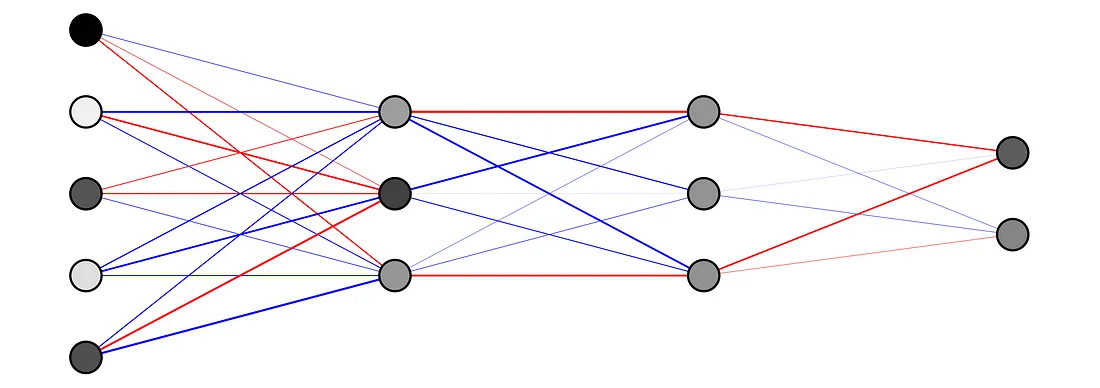
The first layer is the input layer. Input layer activations come from the input to the neural network. The final layer is the output layer. The activations in the output layer are the output of the neural network. The layers in between are called hidden layers.
2. dataset:
To read data from a CSV file using pandas (pd), you can use the read_csv function:
import pandas as pd
df = pd.read_csv('cancer_classification.csv')
3. Training on a simple dataset
This module likely contains functions or classes for preparing your raw data for analysis. This can include tasks such as handling missing values, encoding categorical variables, scaling numerical features, and splitting the data into training and testing sets.
Note
You can view the code and access by clicking the. link to DataPreprocessing class
This part of your pipeline focuses on understanding the structure and characteristics of your dataset. It might include functions or classes for displaying basic statistics (like mean, median, standard deviation), visualizations (like histograms, scatter plots, or correlation matrices), and checking for any anomalies or inconsistencies in the data.
Note
- You can view the code and access by clicking the.
Here, you're training a machine learning model on your preprocessed data. This typically involves selecting an appropriate algorithm (like a neural network), defining a loss function, and optimizing model parameters using an optimization algorithm (like stochastic gradient descent).
Note
You can view the code and access by clicking the link to the ModelTraining class.
After training your model, you need to evaluate its performance. This module likely contains functions or classes for computing various evaluation metrics (like accuracy, precision, recall, or F1-score), generating confusion matrices, and visualizing prediction results.
Note
You can view the code and access by clicking the link to the ModelEvaluation class
This appears to be a class for defining a neural network architecture using the PyTorch library. It specifies the layers, activation functions, and connections between neurons in the network.
Note
“You can view the code and access by clicking the link to the NeuralNetwork class.
4. Test the DataPreprocessing class
The preprocessor object is created using the DataPreprocessing class, which prepares the data for training a machine learning model. After splitting the data into training and testing sets using the split_data() method, it normalizes the data with normalize_data(). Finally, it converts the data into tensors with tensorize_data(), ready for model training and evaluation.
preprocessor = DataPreprocessing(df)
x_train, x_test, y_train, y_test = preprocessor.split_data(test_size=0.2, random_state=42)
x_train, x_test = preprocessor.normalize_data()
x_train_tensor, x_test_tensor, y_train_tensor, y_test_tensor = preprocessor.tensorize_data()
5. test the DataExploration class:
information_help(): Their role is to display the methods existing in the DataExploration class.
explorer = DataExploration(df)
explorer.information_help()
output:
DisplayData():Display the first few rows of the DataFrame.
DisplayDataTypes() :Display the data types of each column in the DataFrame.
DisplayDataInfo() :Display information about the DataFrame, including number of rows, columns, and data types.
DisplayDataDescription() :Display descriptive statistics for each column of the DataFrame.
DisplayCorrelationMatrix() :Display the correlation matrix between all numeric columns of the DataFrame.
DisplayCorrelationWithColumn(column):correletion with a specific column
DisplayHeatMap() :Displays a heatmap of the correlation matrix.
DisplayPairPlot() :This method creates a pairplot, also known as a scatterplot matrix, which shows pairwise relationships between numerical columns
DisplayCountPlot() :This method generates a countplot, which is a type of bar plot that shows the frequency of each category in a categorical column of the DataFrame
DisplayBoxPlot():This method creates a boxplot for a numerical column in the DataFrame.
DisplayScatterPlot() :This method generates a scatter plot between two numerical columns in the DataFrame
DisplayHistogram():This method creates a histogram for a numerical column in the DataFrame
DisplayData(): Displays the head of the DataFrame.
explorer = DataExploration(df)
print("DataFrame Head")
explorer.DisplayData()
DisplayDataTypes(): Displays the data types of columns in the DataFrame.
print("\nData Types")
explorer.DisplayDataTypes()
DisplayDataInfo() : Displays general information about the DataFrame.
print("\nData Info")
explorer.DisplayDataInfo()
DisplayDataDescription() : Displays statistical descriptions of the data.
print("\nData Description")
explorer.DisplayDataDescription()
DisplayDataShape() :Displays the shape of the DataFrame.
print("\nData Shape")
explorer.DisplayDataShape()
DisplayMissingValues():Displays information about missing values in the DataFrame.
print("\nMissing Values")
explorer.DisplayMissingValues()
DisplayCorrelationMatrix() :Displays the correlation matrix of numerical features in the DataFrame.
print("\nCorrelation Matrix")
explorer.DisplayCorrelationMatrix()
DisplayCorrelationWithColumn(“benign_0__mal_1”) :Displays the correlation of all features with the target column named “benign_0__mal_1”.
print("\nCorrelation with 'target' column:")
explorer.DisplayCorrelationWithColumn('benign_0__mal_1')
DisplayHeatMap() :Displays a heatmap of the correlation matrix.
print("\nHeatMap")
explorer.DisplayHeatMap()
5. test the NeuralNetwork class
input_features = len(df.columns) - 1
out_features = df['benign_0__mal_1'].unique().sum()
neural_net = NeuralNetwork(input_features, out_features)
print("Neural Network Architecture:")
print(neural_net)
output:
Neural Network Architecture:
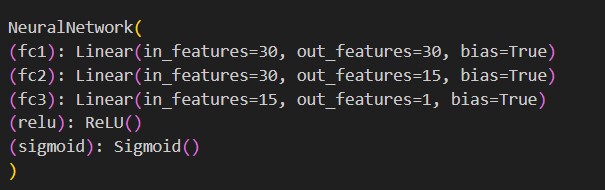
- Here’s the explanation:
input_features = len(df.columns) - 1: This line calculates the number of input features for the neural network. It subtracts 1 from the total number of columns in the DataFrame `df` to exclude the target column (assuming the target column is named `'benign_0__mal_1'`).
out_features = df['benign_0__mal_1'].unique().sum(): This line calculates the number of output features for the neural network. It first extracts the unique values from the target column `'benign_0__mal_1'` using the `unique()` method. Then, it sums up these unique values, which would typically represent the number of classes or categories in a classification task.
neural_net = NeuralNetwork(input_features, out_features): This line creates an instance of the `NeuralNetwork` class with the calculated number of input and output features.
print("Neural Network Architecture") : This line simply prints a message indicating that the following print statement will display the architecture of the neural network.
print(neural_net): This line prints the architecture of the neural network instance `neural_net`. The architecture of the neural network is typically defined by the layers and their configurations, which are specified within the `NeuralNetwork` class. Therefore, printing `neural_net` will display its architecture, including the layers, activation functions, and other configurations specified during its initialization.
6. Testing the ModelTraining class
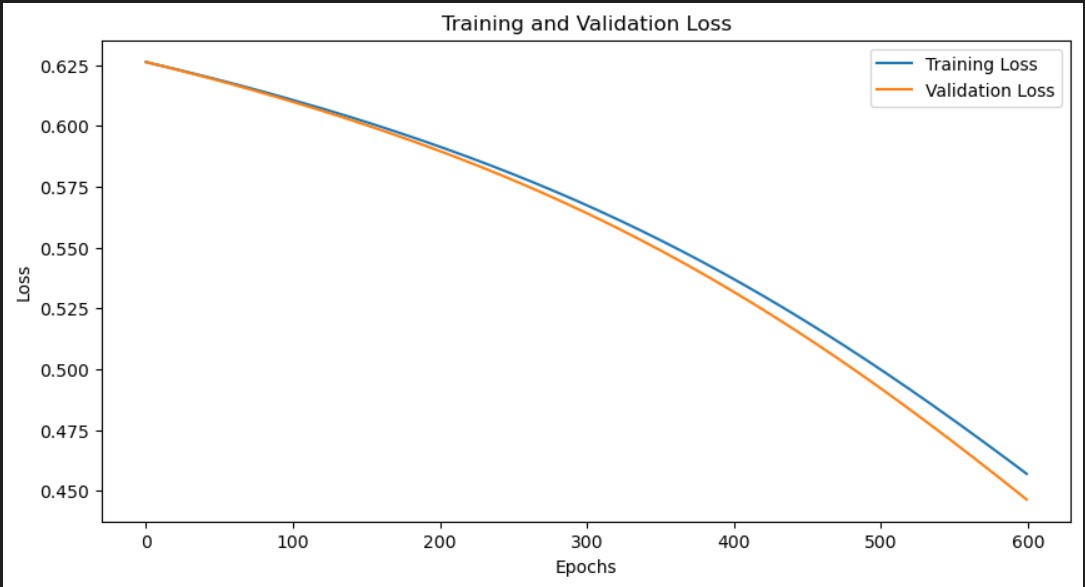
This code snippet demonstrates setting up the neural network model, defining the loss function and optimizer, and then training the model using a ModelTrainer class. During training, it collects the training and testing losses for each epoch.
from torch import nn
model = neural_net
criterion = nn.BCELoss()
optimizer = torch.optim.SGD(model.parameters(), lr=0.01)
from modeltrainer import ModelTrainer
trainer = ModelTrainer(model, criterion, optimizer)
train_losses, test_losses = trainer.train(x_train_tensor, y_train_tensor, x_test_tensor, y_test_tensor, epochs=600)
plot train_losses and test_losses
7. test the ModelEvaluation class
evaluator = ModelEvaluation(model, criterion, optimizer)
model.eval()
with torch.no_grad():
    y_pred = model(x_test_tensor)
    y_pred = (y_pred > 0.5).float()
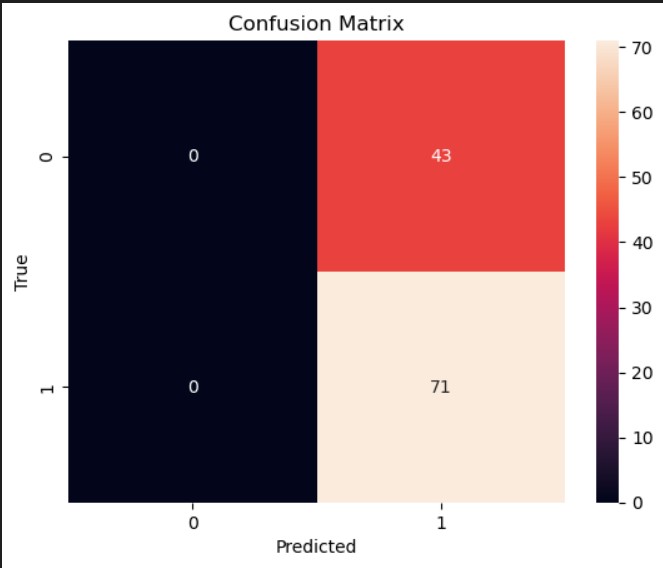
evaluator.confusion_matrix(y_test_tensor, y_pred)
Link to github repository and colab applications:
Note
For more practice and to learn more, we can visit this tutorial.